 Favilla
A coding agent that shows its work
Favilla reads your project, makes the change, runs the checks and tells you what it did, every item of it from its own record. In a desktop window or your terminal, with any model you have.
- Free and open source, MIT
- Windows 10 and 11
- No account, no telemetry


Every step in plain view
The agent’s steps form one line you can open: the files it read, the searches it ran, every edit as a diff with line numbers, every check with its verdict. Plain exploring folds into a single line once the turn is over.
Under each answer a ledger line says what the turn took and did, as Favilla recorded it: time and requests, the files changed with lines added and removed, and whether the last check passed.
Any turn can be undone. Any message can be edited and sent again in a new branch, with the files put back.

Context drawn to scale
The side panel draws the context window as a cross-section of what it holds: system prompt, tools, conversation, reasoning and tool output, with the marks where old output is trimmed and where the session compacts.
The prompt and tools are built once per session and never edited, so the provider’s cache holds on every request. A compaction keeps every word you wrote, verbatim, and is written in the background while the agent works, so nobody waits for it.

It checks its own work
Code that changed after the last run gets its checks run before the answer. A page it built is opened at desktop and phone width in a headless browser, and Favilla reads back what a screenshot hides, in numbers: console errors, sideways scrolling, text under WCAG AA contrast, controls too small to tap.
Name a model of another family and it writes tests from your request alone while the work goes on. A test that fails sends the work back with what the test printed.
A model’s own tests share its blind spots; one from another family does not.
What it cost, and how fast it was
Settings > Usage counts tokens, requests, cost and output speed by day, model and folder. It stays on your computer, and only the numbers do: never what was said.
Speed runs from each reply’s first word to its last, so you choose between providers and relays by what they really give.


The same agent in your terminal
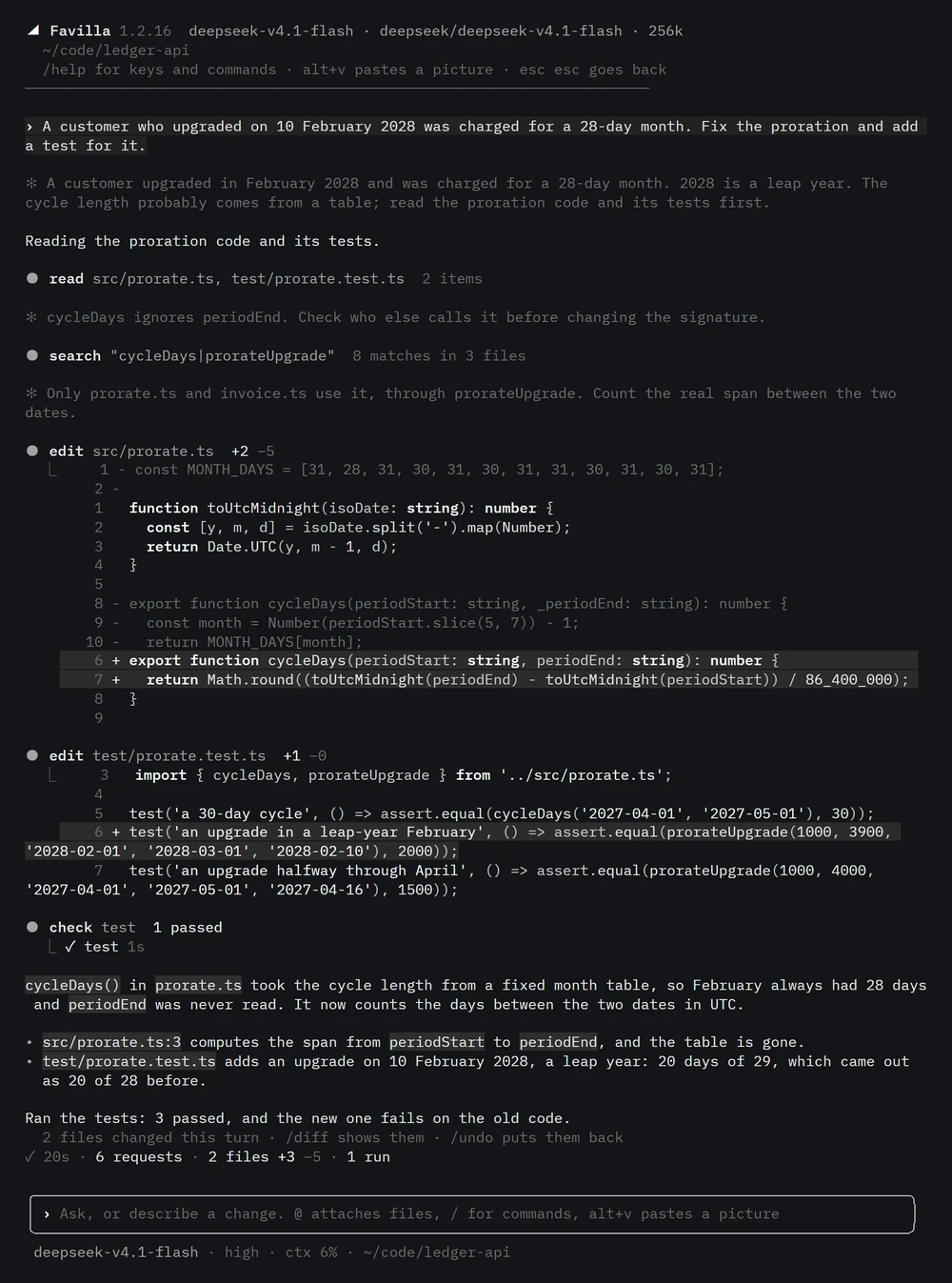
favilla, or fav for short, opens the terminal UI in any folder. Replies print block by block as each settles, so a long answer never redraws the screen. Diffs come highlighted, commands with their exit code, and every turn ends on the same ledger line as in the window.
The Windows installer puts both commands on your Path, running on the app’s own runtime. Esc stops the agent, Esc Esc goes back to an earlier message, and /undo puts the files back.
Bring any model
Sign in with ChatGPT, paste an API key, or point it at a server on your own machine. Every model gets the same tools, so a session can change model halfway without compacting, and each model gets the reasoning levels it really takes, read from the provider or from models.dev.
Reasoning goes back to each provider exactly as it came: Claude’s signatures, OpenAI’s encrypted reasoning, Gemini’s thought signatures.
- ChatGPT sign-in
- Claude
- Gemini
- DeepSeek
- Kimi
- GLM
- Qwen
- OpenRouter
- xAI
- llama.cpp on your machine
- any OpenAI-compatible server
Also in the box
Safety that stays out of the way
Deleting a root or your home, throwing away uncommitted work, force pushes, publishing packages: those wait for your yes. Everything else just runs, and every file a turn changed can be put back.
Sub-agents that do not collide
A sub-agent that changes files is given the files it may change. Its report ends with what Favilla recorded: the files it changed and the commands it ran, with their exit codes.
Your phone, through your own relay
Pair a phone and use the app from anywhere while the computer is on, sealed end to end. The relay is a small Cloudflare Worker you deploy yourself.
MCP servers and skills
MCP servers reach every session as tools. Skill folders in .favilla, ~/.agents or ~/.claude are listed in one line each and read when a task matches.
Search and a browser
GPT models search with the provider’s own tool, every other model with a built-in search that needs no key. The browser is used the way a person uses one: clicks, forms, tabs and downloads, at the width you ask for.
Ten languages
The window and the terminal in English, Simplified and Traditional Chinese, Japanese, Korean, Spanish, Portuguese, French, German and Russian. Input methods show their candidates where you type.
Light on disk and memory
A long session went from a 36 MB file to 0.3 MB. Sessions you are not using leave the app’s memory after 15 minutes.
A window that never freezes
The engine runs in a process of its own, so a long step never holds up the window. If the engine stops, the app starts it again and the page reconnects.
Measured on the same model
Favilla and Codex CLI on the same model, effort and tasks, in alternating order. The hidden tests were added only after each agent had finished.
UI suite: 4 tasks, 2 runs each, gpt-6-luna at high effort
| Favilla | Codex CLI | |
|---|---|---|
| Passed | 8 / 8 | 2 / 8 |
| Time, all runs | 44 min | 25 min |
| Input tokens | 7.13M | 0.69M |
Favilla took longer and read more to get there. The suite and its runner are in the repository, under evals.
Download
Windows
Favilla 1.2.17 for Windows 10 and 11, 64-bit. The installer sets up the app and puts favilla and fav on your Path.
The first public build is on its way.
The installer is not code-signed yet, so Windows SmartScreen may stop it once: choose More info, then Run anyway.
From source
On Windows, macOS or Linux, with Node 22 or later and pnpm 9.